Premium
 VIP
VIP Beta Tester


Instructional PDF 1 page
Lesson Discussion
About This Lesson
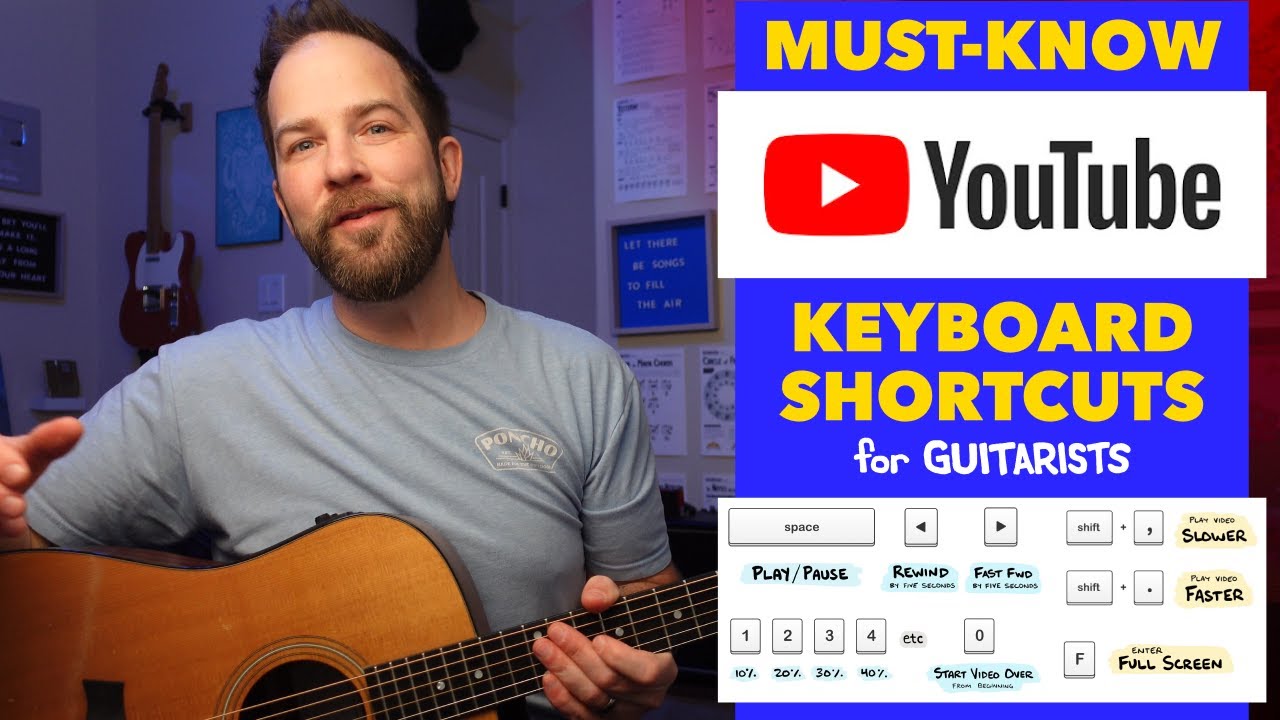
In today’s lesson I want to walk you through some must-know YouTube keyboard shortcuts to help you learn guitar faster. Let’s face it — a miracle of the modern age is the access we all have to video lessons, fan covers, or artist performances on YouTube — each of which makes our learning journey so much faster.
As great as this is, there’s the awkward dance of moving our hands from guitar to our computer mouse so we can use the cursor to click and rewind, pause, fast forward, or otherwise adjust the video that’s playing. Trust me when I say there is a better way.
I’m talking about keyboard shortcuts. By learning just a few, you’ll be able to control playback in a small fraction of the time it takes to use your mouse & cursor. This removes frustration, increases the time we’re actually playing the guitar, and gets us where we want to go that much further. So let’s dive in!
- 0:00 Introduction
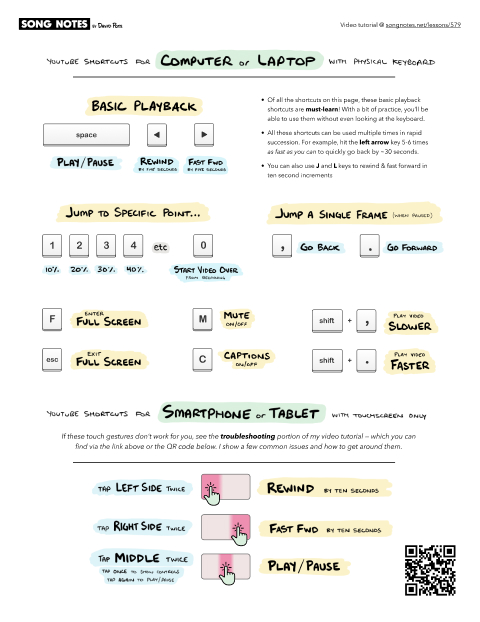
- 0:44 Play/Pause
- 1:09 Rewind & Fast Forward
- 2:53 Jumping to a specific point
- 3:48 Frame-by-frame movement
- 4:27 Muting, Captions, Full Screen
- 5:15 Playback Speed
- 6:00 Touch Screen Shortcuts (smartphone and tablet)
- 7:28 Troubleshooting Tips!
Watching YouTube Shortcuts in Action…
One of my favorite YouTube channels is that of Michael Palmisano, who does “react” videos where he gives his expert musician take on live performances. He goes into each video blind (knowing nothing) with guitar-in-hand… and it’s always impressive to watch him immediately identify what’s going on musically.
Something you’ll notice in all of his videos is his use of YouTube keyboard shortcuts — exactly as I demonstrate in this video. I recommend his channel in general, but specifically to watch someone go through this loop of watching, pausing, rewinding, watching again — all while he works out what’s going on with his guitar.
Here’s one of my favorites of his, where he watches Chris Stapleton’s breakthrough performance with Justin Timberlake at the 2015 CMA awards. Check it out!
Troubleshooting: Keyboard Shortcuts Aren’t Working…
If you’re using a Mac or Windows device, play a video, and the keyboard shortcuts aren’t doing anything — this is likely because the video is no longer in focus.
This is a fancy web development term that means the video no longer has the metaphorical spotlight shining on it… likely because you clicked something elsewhere on the page, or clicked on another window altogether.
To fix this, you need to simply click on the video (anywhere will do) — which will bring it back in focus. Now, the keyboard shortcuts should work.
Troubleshooting: iPad Won’t Rewind or Fast Forward
If you’re viewing an embedded video on a webpage (such as my Song Notes website) on your iPad, you may find that the rewind & fast forward gestures don’t work. Specifically, I’m referring to the gesture of double-tapping the right- or left-side of the screen.
This is because, by default, Safari (the built-in web browser) on iPads is set to load the “desktop version” of websites. As such, touch gestures won’t work. You’ll need to load the “mobile version” of the website to enable these gestures.
There’s two ways to do this:
To load the mobile version for a single webpage,
- Load the webpage in your iPad (using Safari)
- Click the icon in the far-left the address bar
- Click the three dots “…”
- Click “Request Mobile Website”
- Now the touch gestures should work.
To load the mobile version for all websites by default,
- Load the Settings app on your iPad
- Look for “Safari” – which in the most recent version is under “Apps”
- Under Safari settings, tap for “Request Desktop Website” option
- Disable the setting for “All Websites”
- Now, all websites will load with their mobile version. Reload the page in question, and all touch gestures should work.
Browse Related Lessons
Click any tag below to view other lessons I've made in that category:
Enjoy My Lessons? Show Your Support!
Most of the lessons on my website are 100% free. If you have the means, please show your support with a tip jar contribution. I put many hours into every lesson — but it only takes you a minute to make a donation. You have my thanks!
Looking for More Song Lessons?
Featured Courses
Fun & Helpful Tools I've Made
Subscribe to my YouTube channel
Be sure to never miss a lesson by subscribing on YouTube. I put out 2-3 new videos every week. These include full song lessons, as well as covers, practice tips, behind-the-scenes updates. Thanks!
Recent Lessons
-
October 23, 2026
[NEW] Metronome & Tempo Timer Tool!
-
October 12, 2026
"Love Me Two Times" by The Doors
-
September 30, 2026
Shuffle vs. Straight Rhythm... Hear the Difference!
-
September 25, 2026
Red River Valley - Travis Picking Deep-Dive!
-
September 16, 2026
"Sweet Jane" by Velvet Underground
-
September 14, 2026
Practical Music Theory: 1-4-5 Chords & Why They're Important
-
September 9, 2026
Q&A: Understanding Secondary Dominants (ft. Sierra Ferrell)
-
August 28, 2026
Learn Riffs Faster with Chunking (ft. Johnny Cash)
-
August 20, 2026
[Updated] Chord Changes & Learning New Chords